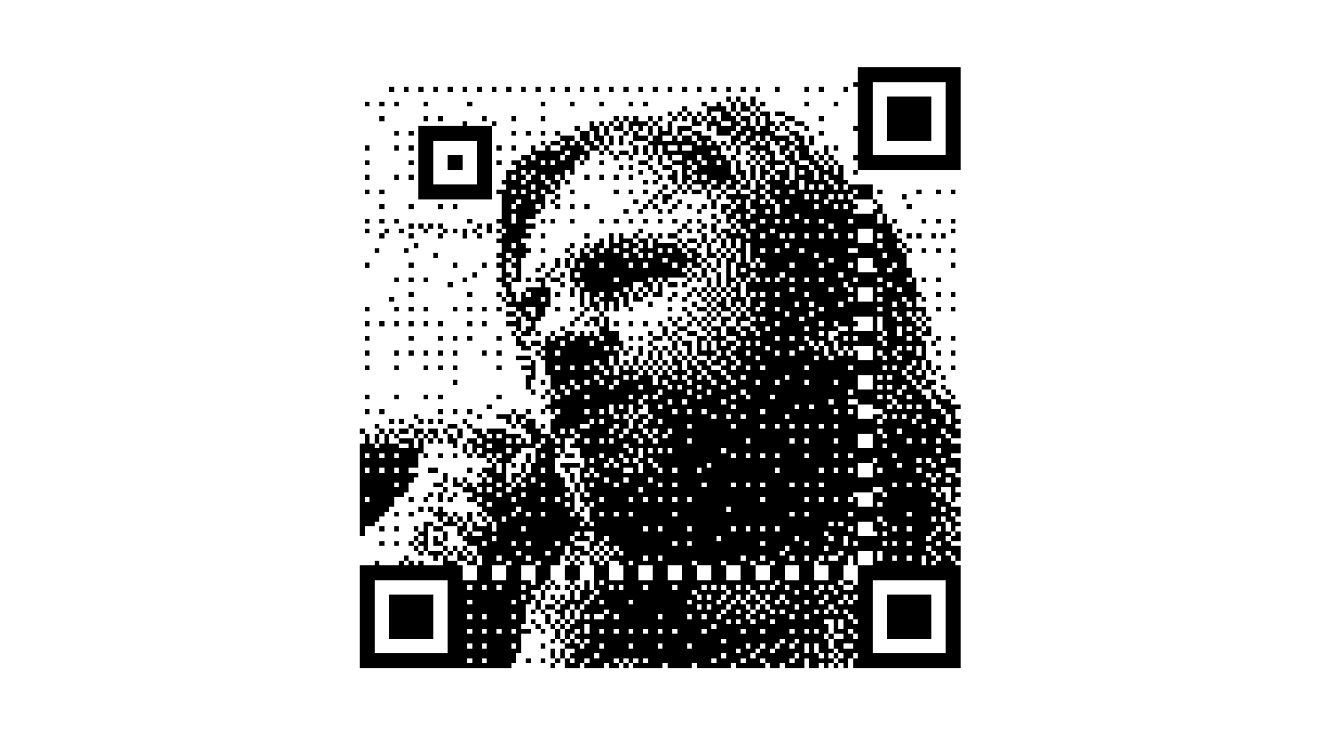
Dithered QR Codes: Hiding a Photo Inside a Working Code
Developer Andrew Taylor explains how error diffusion and a two-pass trick let a QR code carry a one-bit portrait while still scanning, turning data modules into halftone pixels.
A QR code can still scan with a photograph hidden inside it, if you know how to bend the rules. Andrew Taylor, the developer behind the Dithered QR code generator, has published a walkthrough of the technique behind his tool, which turns ordinary codes into one-bit portraits; the source code is available on Codeberg.
Anatomy of a QR code
A QR code is a grid of squares split into two parts: the function patterns, the bold shapes that let a scanner find the code and work out its orientation, and the data modules, which store the actual payload plus header bytes. Because the data modules are only read after the scanner has locked onto the function patterns, they can be modified — which is why brands print distinctive QR codes — though every tweak trades away some robustness.
Hiding a photo in the noise
One route, demonstrated by Dave Richeson in a post Taylor cites, is to shrink each data module: divide every pixel into a 3x3 grid, store the encoded bit in the middle cell and use the other eight for the picture. The result is a low-resolution one-bit photo covered in salt-and-pepper noise, since one in nine pixels still has to carry data.
Dithering and error diffusion
Halftones normally come from dithering — a Bayer pattern, for instance — which fakes midtones with a checkerboard of black and white. Error diffusion goes further: when a pixel is thresholded, the resulting error is spread to nearby pixels that have not been decided yet, so each area ends up closer to its true average brightness than with regular dithering, and the less regular texture is easier on the eye. Taylor's example is a 147x147 one-bit Floyd–Steinberg rendering of Michelangelo's David.
To stop the data modules from sparkling, he runs the diffusion twice. The first pass forces those modules to their required colours and diffuses the resulting error into the surrounding eight pixels — the error can reach 95% when a dark-area pixel must be pure white — and the second pass diffuses normally. Masking that first error is, he writes, exactly what makes the image readable.
The price: scannability
There is a trade-off between looks and reliability. A code that scans from a laptop screen on your phone may fail on a stranger's phone from a printout in poor light. The generator also outputs tiny images with no margin, while scanners need a quiet zone; browsers blur enlarged images unless CSS image-rendering is set to pixelated. The margin colour should match the background of the finder patterns — normally white, though inverted QR codes need black.
SiTech — AI-powered web development
We build fast, modern websites and bring AI into real business workflows. Have a project or a question? We'd love to help.