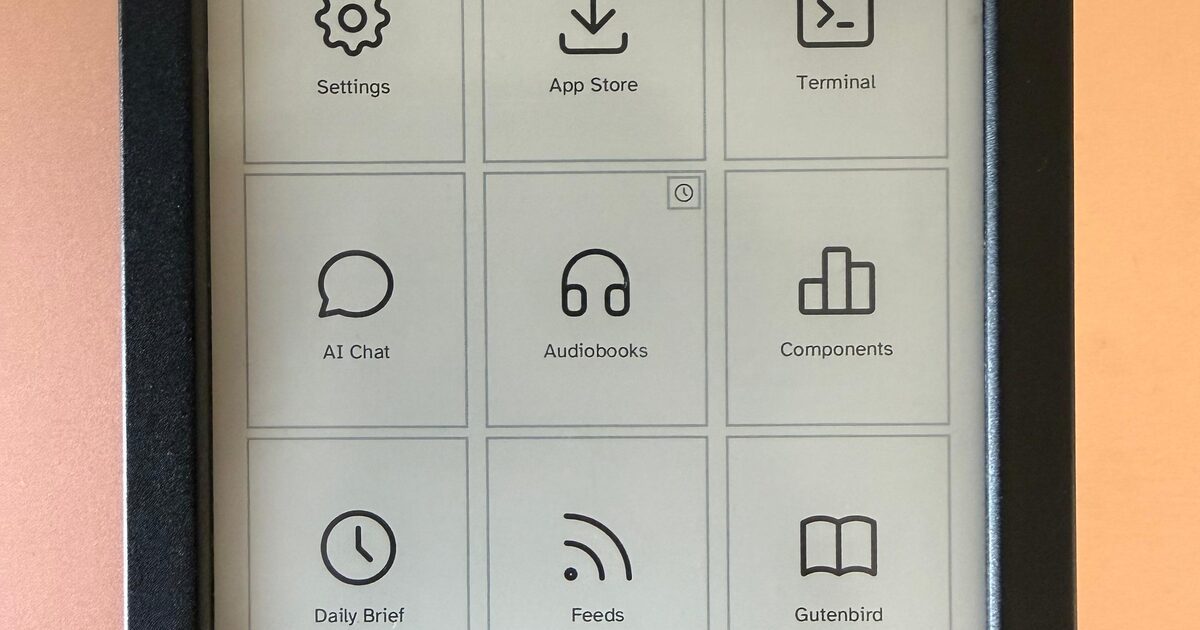
Cobalt turns Kobo e-readers into app platforms with a launcher and Wi-Fi store
An open-source project called Cobalt adds a launcher, a signed app store and a Rust SDK to Kobo e-readers, so owners can install apps over Wi-Fi while the stock reader stays available.
Kobo e-readers have never been general-purpose computers: they display books, they sync a store library, and that is roughly where the story ends. An open-source project called Cobalt is trying to change that. It describes itself as an application platform for Kobo devices — a launcher, a signed app store, a Rust software development kit and a runtime that keeps every application in its own unprivileged process.
The project drew attention in August 2026: it was featured on Product Hunt and reached the top of Hacker News with 662 points. Cobalt states that it is an independent project and is not affiliated with Rakuten Kobo.
Apps on an e-ink screen
After a single USB setup, apps are browsed, installed, updated and removed over Wi-Fi; a cable is no longer needed for each new application. Apps are separate choices rather than a bundle — one can be removed without reinstalling the platform or disturbing the others. Every package is checked before it opens, and an interrupted install or update leaves the working version in place. Cobalt updates stay separate from app updates, so the store cannot replace the platform itself.
The current catalogue includes a launcher, the store, an arXiv reader that displays complete papers with sections, tables, figures and mathematical notation, a Zotero reader, Lichess chess, Hacker News with full comment threads, Gutenbird for any OPDS library such as Project Gutenberg or Standard Ebooks, feeds, flashcards, Sudoku, backgammon, a terminal, and Sidekick, which lets an owner approve or deny requests from coding agents such as Claude Code away from the keyboard.
Installation and safety
Installation is meant to be simple: the reader is plugged into a computer and the browser writes Cobalt across in about a minute without a terminal, or the same result comes from the command curl -fsSL https://bandarlabs.github.io/Cobalt/install.sh | sh. After a restart, Cobalt is opened from Kobo's own menu, and the store then delivers new apps over Wi-Fi.
Cobalt does not replace Kobo's boot chain: a reboot returns to the stock reader, and the normal panel-write entry points require an exact hardware and firmware match. The first installation does modify files on the user storage partition, and the project is provided without warranty. Tested devices are the Clara BW, Clara Colour, Elipsa 2E, Clara HD, Libra 2, Libra Colour and Libra H2O; other models can start Cobalt too, after it shows what has not been tested and asks once whether to continue. The code is licensed AGPL-3.0 and published as BandarLabs/Cobalt.
SiTech — AI-powered web development
We build fast, modern websites and bring AI into real business workflows. Have a project or a question? We'd love to help.