Z80 REPL: Z80 assembly instructions in the browser
ABA Games has published z80-repl, a browser tool that assembles and runs single Z80 instructions and immediately shows their effect on registers, flags and memory. The MIT-licensed project runs entirely client-side.
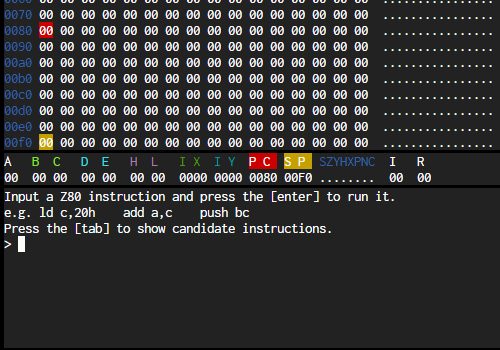
ABA Games has published z80-repl, a small browser environment for the Z80 processor. Live at abagames.github.io/z80-repl, it turns the classic eight-bit CPU into an interactive prompt: you type one assembly instruction, press Enter, and it is assembled and executed on the spot, with the effect on registers, flags and memory drawn on screen.
An assembly prompt, not an emulator window
The page is split into three text panels. The top one shows the first 256 bytes of the 64 KB address space as a 16×16 hex grid with an ASCII column on the right, and the values matching PC, SP, HL, BC, DE, IX and IY are highlighted in different colours. Under it sits a register pane listing A, B, C, D, E, H, L, IX, IY, PC, SP, the I and R registers and the S Z Y H X P N C flags, each shown as set or clear. The third panel is the REPL itself, an xterm.js terminal.
The help line spells out the model: “Input a Z80 instruction and press the [enter] to run it”, with examples such as ld c,20h, add a,c and push bc. The instruction is written into memory at the program counter, then executed by the emulator core, and the REPL prints the resulting opcode bytes together with the cycle count. Tab lists candidate instructions matching what you typed, and the arrow keys walk through command history.
Stepping, loops and limits
Enter on an empty line runs whatever instruction already sits at PC, which makes the tool usable as a debugger for short routines. If an instruction does not move the program counter — a HALT, for example — the REPL executes it up to 64 times and then reports “Looping 64 times. Press the [enter] to continue.” Unknown mnemonics produce a plain “unknown instruction” message rather than failing silently.
The machine model is deliberately minimal: memory is a flat 64 KB array with no banking, and the I/O callbacks are stubs that return zero on reads and discard writes, so there are no ports, video or sound hardware to drive. On start-up PC is set to 0x80 and SP to 0xF0.
What it is built on
The project is written in TypeScript and uses the Z80.js emulator core by DrGoldfire with xterm.js for terminal rendering; everything is bundled into one script and served from GitHub Pages, so no code runs on a server. The repository carries an MIT licence and dates from September 2018.
For retro developers and students that combination is the point. The Z80 powered machines such as the ZX Spectrum, MSX, Amstrad CPC and Sega Master System, and running a single instruction to watch the flags change is a quicker way into the architecture than reading a reference manual.
SiTech — AI-powered web development
We build fast, modern websites and bring AI into real business workflows. Have a project or a question? We'd love to help.