CorelDRAW's New Text-to-Vector AI Turns Prompts and Images into Editable Curves
Corel added a Text-to-Vector tool to CorelDRAW in its September 2026 suite update. It builds editable vector artwork from a prompt or an existing logo, illustration or photo, but precise control is still incomplete.
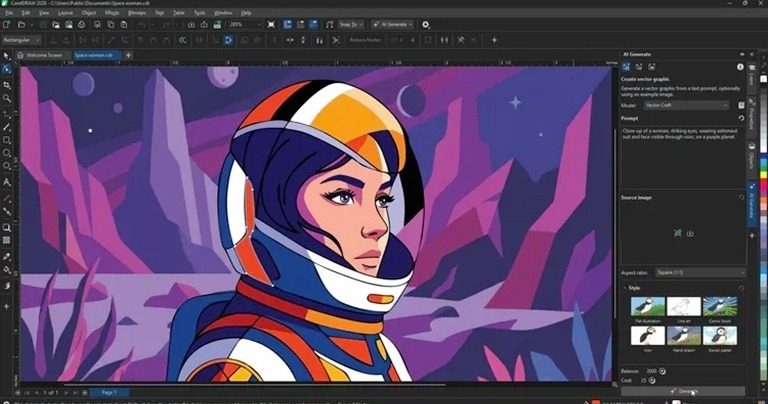
Corel has added a Text-to-Vector tool to CorelDRAW as part of the September 2026 update of CorelDRAW Graphics Suite. The feature turns a text prompt, or existing visual material such as an illustration, a logo, a product design or a photo, into an editable vector image.
What Text-to-Vector Produces
The result is not a flattened picture. Colours, shapes, individual objects and other elements can be changed the same way as in ordinary vector work. Three models are available inside the tool: Vector Spark for fast, simple tasks such as icons and clip art, Vector Craft for more universal jobs, and Vector Master for complex designs and variations built on reference material.
Starting Material, Not a Finished Piece
According to the source, that is the most interesting part of the release: the AI does not deliver a final artwork, it prepares the starting material. The generated image enters the designer's workspace as vector objects, curves and nodes, where it can be worked on by hand.
The approach is most practical when a designer already has an established visual language and does not need the model to invent a new style. Building new, connected material from several existing illustrations or logos automates the most routine part of the job. The familiar weakness of generative AI remains, however: when a generated illustration is close to what is needed and only one detail should change, the system cannot always keep the rest of the piece untouched. In the source's example, turning a night scene into a sunny morning can alter other details as well. Corel says more precise, detailed control is one of the main directions for its AI work, but the capability is not complete yet.
Cloud Processing and the Rest of the Update
Corel's generative tools run in the cloud rather than on the user's graphics card. The company has no plans at this stage for a local, GPU-based AI, though that could change if demand grows.
The September release also lets subscribers and technical support users upload system, custom and branded fonts in CorelDRAW Web, and adds DWG and DXF export to the browser version. Text-to-Vector is already available in CorelDRAW Go and CorelDRAW Technical Suite 2026.
Producing an image from a single sentence is no longer news. The value of such tools depends on what can be done with the result, and CorelDRAW's implementation is notable because the AI output does not stay a final product. How much time it actually saves will become clear once the tool is tested on real projects.
SiTech — AI-powered web development
We build fast, modern websites and bring AI into real business workflows. Have a project or a question? We'd love to help.