Google adds three study and research features to Chrome
Google has added three new features to Chrome aimed at studying and research. The most notable preserves a page's exact state, including scroll position and partly filled forms, when a tab is sent to another device.
Google has added three new features to its Chrome browser aimed at studying and research. The most notable change concerns sending tabs between devices.
Tab handoff keeps the exact page state
When a web page is sent from a phone to a laptop, or the other way round, Chrome preserves the exact scroll position and any partly filled forms. A reader halfway through a 50-page research paper who sends the page to a phone can carry on from the same spot.
On a computer the feature sits in the three-dot menu in the top right corner: Cast, Save, and share > Send to Your Device. The button can also be added to the toolbar (Customize Chrome on the New Tab page > Toolbar), and on Android a tab is sent through Chrome's share menu.
Gemini answers questions about media
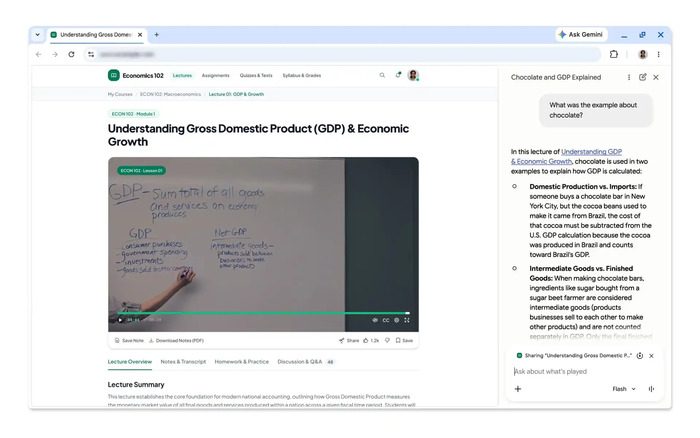
The AI assistant built into the browser, Gemini, has gained new abilities. Users can now ask questions about videos, podcasts and audio recordings that are not hosted on YouTube. Once the media has been played, the assistant in the side panel can pull out the key points, find specific information or explain details that remain unclear.
Quizzes built from the open tab
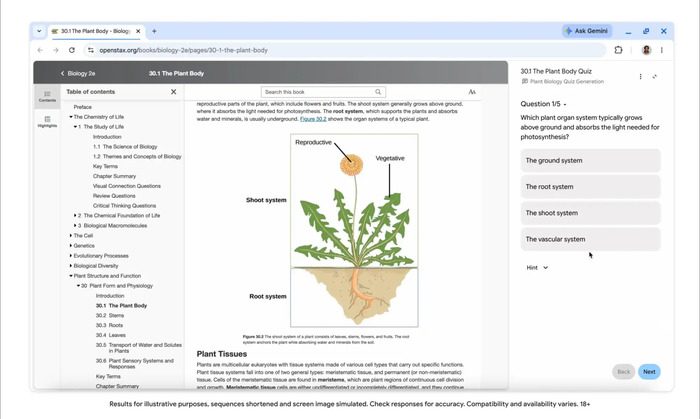
The third addition is interactive quizzes: Gemini can create test questions from the content of an open tab, whether that is a Google Docs document, a YouTube video or a research paper. The tool picks out the key concepts and helps users check how well they have absorbed the material. The feature starts in the United States and India for English-speaking users, with other regions to follow in the coming months; the company is also working to bring the changes to mobile devices.
SiTech — AI-powered web development
We build fast, modern websites and bring AI into real business workflows. Have a project or a question? We'd love to help.