
GrapheneOS: why one app is slow and how to disable the protection for it alone
A long-time GrapheneOS user traced the slow performance of the OsmAnd map app on his Pixel 8 to the hardened memory allocator, and explains how to disable that one protection for a single app without turning it off system-wide.
Martin Sauter, who writes the WirelessMoves blog, has been using GrapheneOS on a Pixel 8 for about a year and says he is happy with the operating system's security and privacy features. One application, however, still runs noticeably slower than on other Android devices: the OpenStreetMap client OsmAnd.
What causes the slowdown
Looking for the cause, he identified the hardened memory allocator, a mechanism that is part of GrapheneOS' exploit protection and appears to create significant overhead for OsmAnd. In his explanation, panning and zooming a map require the app to load and discard data constantly.
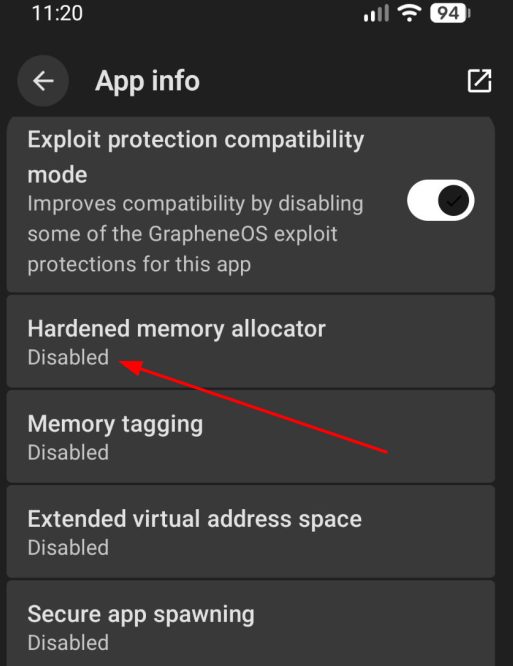
The good news is that the hardening does not have to be switched off for the whole system: it can be disabled for a single application.
Turning the protection off for one app
The procedure is short. Long-press the app icon, choose "info" and look for "Exploit protection" in the list. Protection should stay enabled in general; only "hardened memory allocator" has to be switched off. After restarting OsmAnd, the app is as fast as before.
The price in security
Disabling the allocator weakens that app's defence against memory-related exploits, so the decision is a trade-off. In Sauter's case OsmAnd only reaches the network for occasional map updates, which makes the balance between security and speed acceptable to him. He also notes that his search led him to CoMaps, another open-source map application that meets almost all of his needs.
SiTech — AI-powered web development
We build fast, modern websites and bring AI into real business workflows. Have a project or a question? We'd love to help.