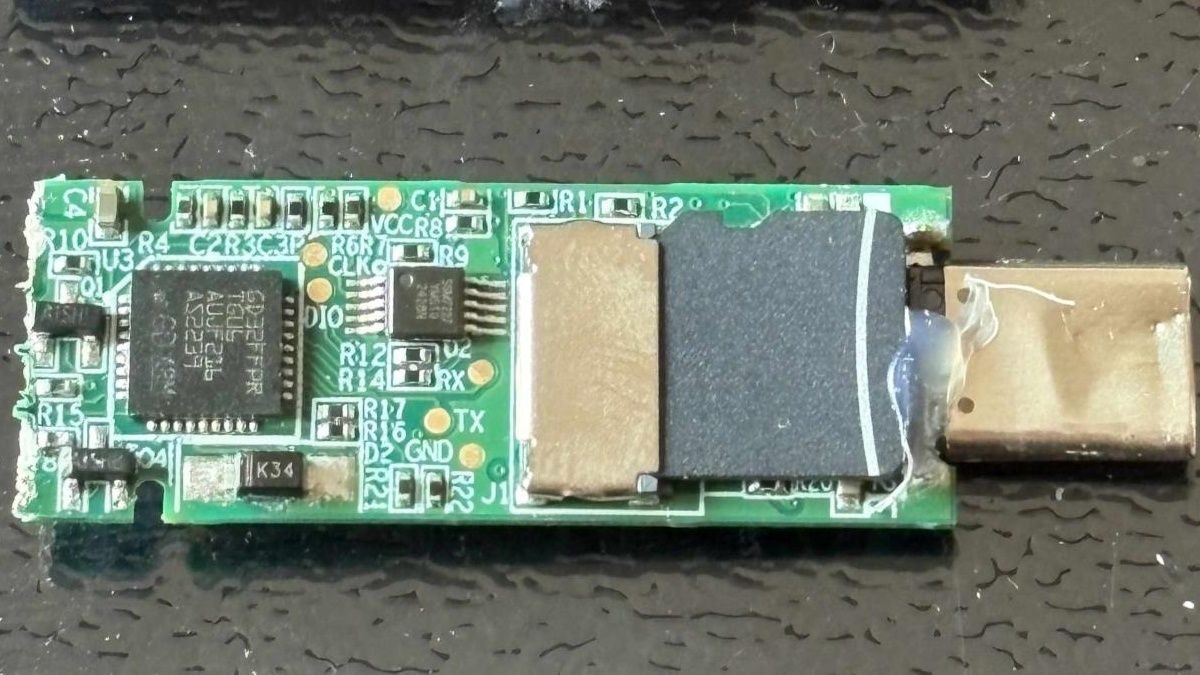
Lenovo ThinkPlus FU100 Fingerprint USB Drive Found to Be Unencrypted SD Card
Security researcher Xusheng Li found Lenovo's ThinkPlus FU100 fingerprint USB drive was an unencrypted SD card, and an AI-assisted follow-up exposed backdoors and hardcoded keys in other products.
Security researcher Xusheng Li found that Lenovo's ThinkPlus FU100 fingerprint USB stick, sold as an AES-256-encrypted device, was internally just a plain SD card. The fingerprint reader only enabled the USB connection, and nothing on the card was actually encrypted. An AI-assisted follow-up last week found backdoor accounts on another maker's drive and hardcoded keys in other supposedly secure USB storage products.
Lenovo FU100 findings
Li presented the FU100 as 'just an SD card in a fancy case,' saying physical access makes the data trivial to reach. The original analysis happened last year, with an interim fix using epoxy over the card. A later Lenovo fix, released early this year for the FU100, FU200, TU800 drives and TSD303 SSD, requires owners to call a China service line and either send devices back for replacement or receive an on-site firmware upgrade. Lenovo advises backing up data first and strongly recommends wiping the drive before sending it in. Lenovo rated the advisory severity as high, and one of three CVEs covers configuration software that could let a local, logged-in user bypass device authentication and enroll an untrusted fingerprint.
TSD303 password flaw
The same research found a different issue in Lenovo's TSD303 external SSD. Its data was encrypted, but the drive sent the correct password back over USB in plain text for the software to compare. A first fix, three months after the initial report, used block cipher encryption with a key derived from a timestamp-like value; Lenovo's software could derive that key, so the fix was vulnerable if taken apart and did not protect data on a stolen device. A later fix, late last year, has the drive check the typed password itself, so the correct password never leaves the drive.
Other vendors and AI-assisted reverse engineering
The same SDK covered nine other devices from multiple vendors, most of which could also reveal passwords to a savvy actor; two left data unencrypted on a microSD card. Copy protection differs from direct access, since its intent is to let recipients view files but not copy them. Li used OpenAI's Codex with his employer's reverse-engineering tool against other vendors' protection schemes. Netac's tool took about seven minutes to break after Codex found a fixed key built into the program and the user's password written to diagnostic logs. KakaSoft's USB Copy Protection had an internal password the program builds itself, which Codex rebuilt to decrypt a test file without the user's password in around 26 minutes. Nexcopy's Copy Secure took about 10 minutes, with its key unlocked by a certificate built into the viewer app. SecZure's YutianDun had two hidden backdoor accounts with simple passwords, discovered with time-travel debugging. Li's comments suggest malicious intent cannot be assumed.
Disclosure and mitigation
Li gave no warning to KakaSoft, Nexcopy, or SecZure, arguing that a drive already in an attacker's hands cannot easily be recalled or updated. He said client-side validation is never secure and users should verify security claims themselves. Netac had no patch as of Li's March talk. As an example of encryption done properly, Li cited an open-source USB stick that derives its key from the user's password, so reading the microSD card alone gets an attacker nothing.
Sources: Tom's Hardware
SiTech — AI-powered web development
We build fast, modern websites and bring AI into real business workflows. Have a project or a question? We'd love to help.