Windows 11 Collects Data on Coding Agents and Developer Tools via MissionControlAggregator
Windows 11's MissionControlAggregator tracks coding agents like Codex, Claude, Copilot, Cursor and developer tools including Python, .NET, GCC, VS Code, uploading data to Microsoft when optional diagnostics are enabled.
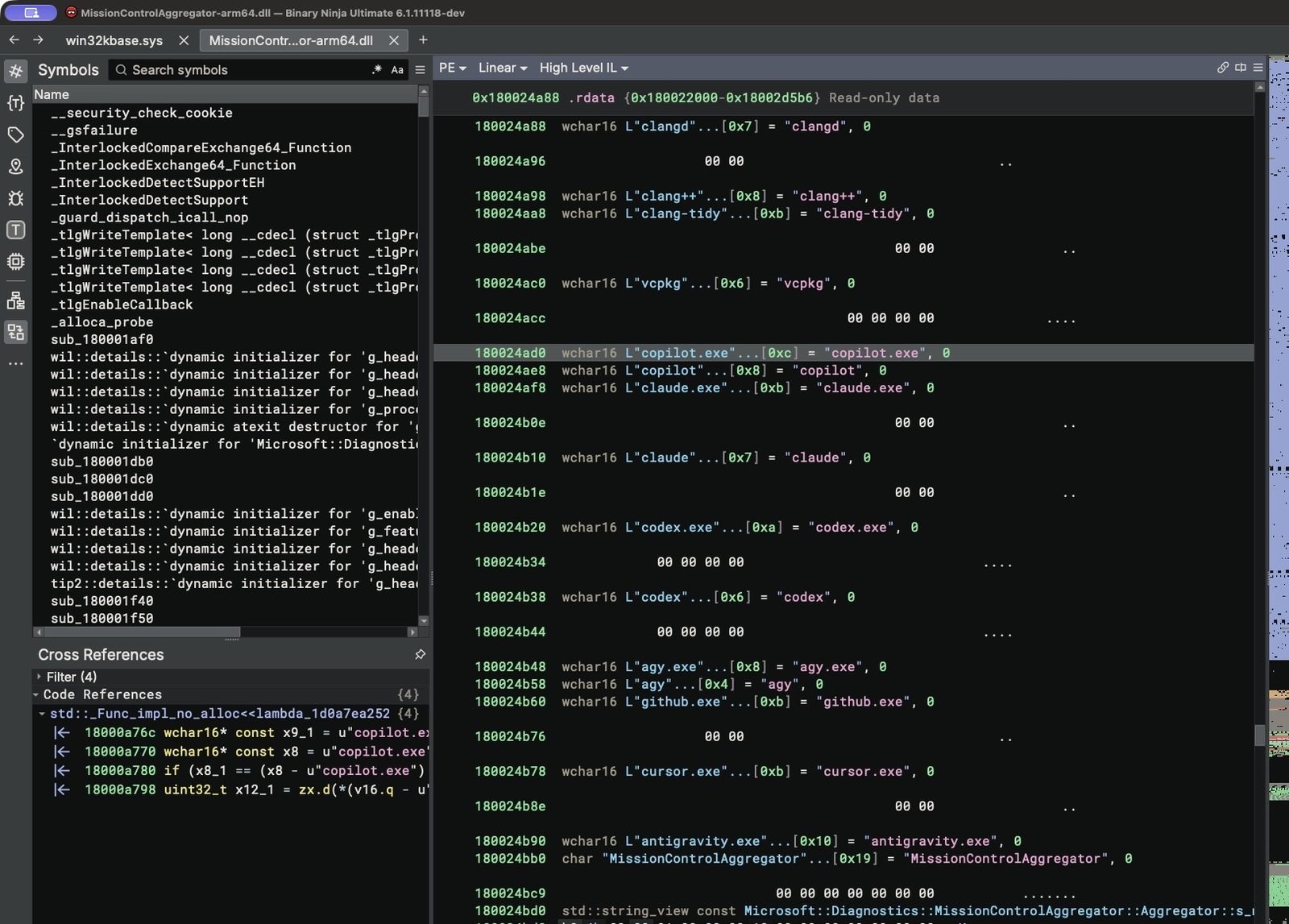
A reverse engineering investigation has found that Windows 11 includes a component called MissionControlAggregator that records which coding agents and developer tools are used on a device and sends that information to Microsoft when optional diagnostic data is enabled. The component identifies specific executables such as codex.exe, claude.exe, copilot.exe, cursor.exe, and tools like python.exe, dotnet.exe, gcc.exe, and code.exe.
How the Component Works
MissionControlAggregator.dll contains explicit lists of coding agent and developer tool executable names. It uses four slots for command line agents including copilot.exe, claude.exe, codex.exe, and agy.exe, and five slots for desktop agents such as github.exe, claude.exe, codex.exe, cursor.exe, and antigravity.exe. The component also checks for broader developer tools like node.exe, python.exe, dotnet.exe, gcc.exe, clang.exe, gdb.exe, javac.exe, devenv.exe, and code.exe. Some checks verify the publisher, expecting Node.js Foundation for Node.js, Python Software Foundation for Python, and Microsoft Corporation for .NET and Visual Studio.
Data Collection and Upload
The aggregator does not scan processes directly. Instead it subscribes to existing Windows events: KernelProcess.AppStateChangeSummary and Win32kTraceLogging.AppInteractivitySummary for regular Windows programs, and Microsoft.Windows.Lxss.Manager.Exec and ExecCritical for WSL. When a match occurs, a bit is set in the aggregator state. Roughly once per day, the component emits an ETW event named Segments.SubCohorts containing bitsets for twelve tool categories, four CLI agents, and five desktop agents. If optional diagnostic data is allowed (enabled by default in US setups), the event is queued in DiagTrack's upload queue and transmitted to Microsoft.
Testing and Verification
The researcher tested the behavior on a Windows 11 ARM64 virtual machine. Renaming cmd.exe to codex.exe and running it caused the aggregator to set the Codex CLI bit. The persisted state was found in C:\ProgramData\Microsoft\Diagnosis\AggregatorStorage\MissionControlAggregator$. By adjusting the reporting window and restarting DiagTrack, the Segments.SubCohorts event was captured showing the Codex bit. A similar test with gcc.exe set the compiler/debugger category bit. Inspection of DiagTrack's EventStore database confirmed the agent usage report is treated as optional diagnostic data and uploaded when that setting is on.
User Control
Users can decline optional diagnostics during Windows setup or later disable Send optional diagnostic data under Settings, Privacy & security, Diagnostics & feedback. The Connected User Experiences and Telemetry service (DiagTrack) runs automatically and hosts AggregatorHost.exe, which loads MissionControlAggregator.dll. The feature is not active on every Windows installation by default; the public ISO baseline had it disabled, but the test VM had it enabled as a service experiment.
Sources: xusheng.dev
SiTech — AI-powered web development
We build fast, modern websites and bring AI into real business workflows. Have a project or a question? We'd love to help.