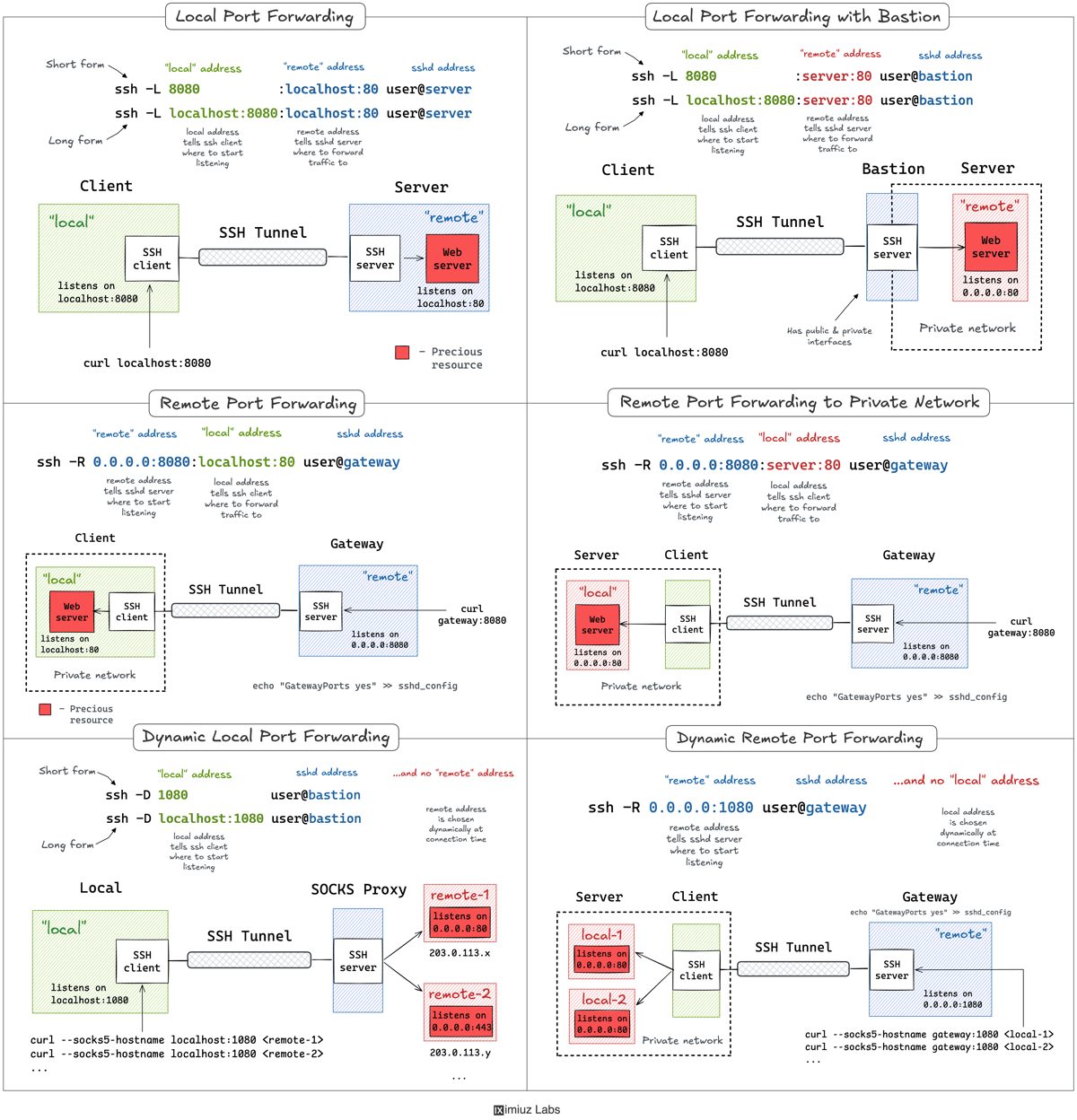
A Practical Guide to SSH Tunnels: Local and Remote Port Forwarding
A practical guide to SSH tunnels from iximiuz Labs: how local port forwarding (-L) reaches services behind a bastion, how remote forwarding (-R) exposes a local service through a gateway, and how -D turns the SSH client into a SOCKS proxy.
SSH is an old technology that refuses to go away, and its tunneling features still do in a single command what a pile of newer tools struggle to match: reach an internal VPC endpoint through a public bastion, open a remote development VM's localhost port in your browser, or expose a local server to the outside world. Ivan Velichko's practical guide on iximiuz Labs walks through local, remote and dynamic port forwarding, with labs running on a playground of four hosts and three networks.
Local port forwarding
The -L flag starts the forward on the client side: the SSH client listens on a local port, and traffic that arrives is forwarded to remote_addr:remote_port, reached from the machine you logged into. The syntax is ssh -L [local_addr:]local_port:remote_addr:remote_port [user@]sshd_addr, and ssh -f -N -L runs it in the background. In the first lab a web server bound to the remote host's own 127.0.0.1:80 is unreachable over the network; after ssh -f -N -L 8080:localhost:80 203.0.113.30 the same page answers on local port 8080.
The command can forward to a machine other than the SSH server. In ssh -L 8081:172.16.0.40:80 203.0.113.30 the bastion accepts the connection and opens a second hop to the private VPC host. Loopback-bound ports need one more trick, because the forward is resolved by the bastion and cannot see 127.0.0.1 on the target. Adding -J jumps through the bastion and ends the session on the target itself: ssh -f -N -J 203.0.113.30 -L 8082:localhost:9000 172.16.0.40 makes a debug port that is invisible to the network appear locally.
Remote port forwarding
The inverse case — exposing a local service through a public gateway — uses ssh -R [remote_addr:]remote_port:local_addr:local_port [user@]gateway_addr, where the sshd server opens the extra port. The pitfall: by default the tunnel binds only the gateway's own localhost, so the service stays reachable from inside the gateway alone; publishing it on all interfaces requires GatewayPorts yes in sshd_config. With that setting, ssh -f -N -R 0.0.0.0:8080:localhost:80 203.0.113.30 publishes a laptop's localhost-only web server to the network. A variant lets the SSH client act as a jump host and expose a device from a home network the gateway cannot reach.
Dynamic forwarding: SSH as a SOCKS proxy
Instead of wiring one local port to one destination, ssh -D [local_addr:]local_port turns the SSH client into a local SOCKS proxy. Each connection names its own destination and the SSH server resolves it, so a single proxied port reaches every host and port behind the bastion: curl --socks5-hostname localhost:1080 172.16.0.40:80 works, provided the client speaks SOCKS. Dropping the destination from -R mirrors the idea on the server side, turning sshd itself into a SOCKS proxy; that mode needs OpenSSH 7.6 or newer on the client.
How to remember the flags
Velichko's recap is short: -L makes a remote service available on a local port, -R makes a local service available on a remote port, -D is a local SOCKS proxy, and -R without a destination is a proxy on the server. The mnemonics are ssh -L local:remote and ssh -R remote:local — and it is always the left-hand side that opens a new port.
SiTech — AI-powered web development
We build fast, modern websites and bring AI into real business workflows. Have a project or a question? We'd love to help.